Showing posts with label Basic SAP SD Functions. Show all posts

Thursday, 22 October 2015

How to Create Bill of Materials in SAP SD

A bill of material (BOM) describes the different components that together create a product. For example- A computer is a product. It is a combination of CPU, Keyboard, Monitor, Mouse etc. The bill of material contains the item number of each component, quantity required in the manufacture of a product and the unit of measure of the item.

SAP R/3 allows the creation of various categories of Bill of Material. Some of the categories of the BOM are -
  • Material BOM (T-code CS01) – A bill of material that you create for a material known as material BOM.
  • Equipment BOM (T-code-IB01) – Equipement BOM is used to describe the structure of equipment and to assign spare parts to equipment for maintenance purpose.
  • Sales Order BOM (T-code-CS61) -Sales Order BOM is used for make-to-order production of products according to the requirements of customers.
  • Functional location BOM (T-Code-IB11) – A functional location BOM can be created individually for each functional location or a group of technical objects.
  • Document BOM (T-code-CS11) - A complex document may be made up from multiple documents such as program, papers, technical drawing etc. These related information and documentation object grouped as a unit using a BOM.
Step-1  Create Material BOM
  1. Enter T-code CS01 in the command field.
  2. Enter Material / Plant / BOM usage.

Saturday, 7 February 2015

Create Storage Location in SAP SD

Transaction code :- OX09
IMG Menu Path :- SPRO> SAP Customizing Implementation Guide >Enterprise Structure Definition > Material Management > Maintain storage Location
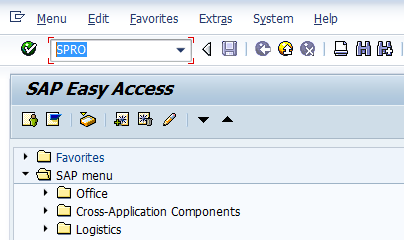
Step 1 :- Enter Transaction Code SPRO in the command field and press enter
SAP SD Certification Questions

 Step 2 : - Click on SAP Reference IMG
SAP SD Certification Questions


Monday, 17 November 2014

Creating a First Sales Order in SAP SD Process

Overview

Transaction VA01: creating a Sales Order from the beginning.
Sales order data in first screen: Document type, Sales organization, Distribution Channel, Division.
Sales order data in second screen: Ship to party, Sold to party. Header and Item data.

VA01

1: Go to Transaction code VA01  to create the Sales Order
Or navigate in menu [Logistics -> Sales and Distribution -> Sales -> Order -> Create ]
Here you have to fill the obligatory fiedls: Order type, Sales Organization, Distribution Channel and Division.
SAP SD Sales Order
2: Choose document type by F4 search in field Order Type. A pop-up window will open with all available document types. Double click to select one.
  SAP SD Sales Order

Tuesday, 7 October 2014

Output Determination Using Condition Technique in SAP SD

Outputs are an essential media of communication with various business partners & internal partner within the organization during or for sales processing. These output can be either be taken as print on paper or generated PDF files or sent by mails/electronically. You can even restrict or allow the trigger of these output.
Output determination using condition technique majorly defines 3 functions:
1. Automatic determination of output in respective object.
2. Processing of output based on some events.
3. Respective parameter/medium for print.
So, output types are assigned to
  • Partner functions,
  • Transmission media and
  • Dispatch time.
You need to co-ordinate with ABAPers for output processing program and form.
Output determination is carried out through condition technique in Sales and Distribution.
Application
Keys Area
V1
Sales
V2
Shipping
V3
Billing
V6
Handling Units
V7
Transport

Types of Output

  • Print Output,
  • Fax,
  • Telex,
  • E-Mail
  • EDI (Electronic Data Interchange)

Output Determination

Output is determined using condition technique.
Output can be determined from customer master, but it is recommended that Output in sales document through output determination procedure(Condition technique). Output can be determined separately for Sales Document: Header and Sales Document: Item level.
Unlike any other determination procedure getting determined through condition technique. The output determination also involves,
  • Condition Table
  • Access Sequence
  • Condition Types
  • Output Determination Procedure
  • Output Determination Procedure Assignment

1.) Condition Table

TCode
V/57
SPRO Path
IMG - SD - Basic Function - Output Control 
- Output Determination using Condition Technique 
- Output Determination for Sales Documents 
- Maintain Condition Table
You have to define combination of fields for which you want condition records in condition tables of output. Provided existing standard condition tables does not meet your requirement. In case of new condition table enter name of condition table, the number of table must be starting from 900. Select the fields for table from allowed fields and generate new condition table.

2.) Access Sequence

SPRO Path
IMG - SD - Basic Function - Output Control 
- Output Determination using Condition Technique 
- Output Determination for Sales Documents 
- Maintain Access Sequence
You have to define new access sequence by copying existing one and change to your requirement, provided standard access sequence does not meet you requirement. It is search strategy which system uses to find out condition records stored in condition tables for condition types. Unlike pricing, all output type has access sequence. Therefore, you maintain output condition record for all output types.

3.) Output Types

TCode
V/30
SPRO Path
IMG - SD - Basic function - Output control 
- Output determination using condition technique 
- Output determination for sales documents 
- Maintain Output Types
You have to define new Output types by copying existing one and change to your requirement, provided standard output type does not meet you requirement.
  • Languages of Output
  • Print Program: print specification
  • SAP Script: layout
  • Partners (to whom you need to send output)
    You need to mention Partner function wise Output type.

3.1.) Assign Output types of Partner Function

SPRO Path
IMG - SD - Basic Function - Output Control 
- Output determination using condition technique 
- Output determination for Sales documents 
- Assign Output type to Partner Function
Here you assign Output types to desired Partner function like SP/SH/PY etc.. Generally that would be the intent recipient of that output type.

4.) Maintain Output Determination Procedure

SPRO Path
IMG - SD - Basic function - Output control 
- Output determination using condition technique 
- Output determination for sales documents 
- Maintain Output determination procedures
You have to define new Output determination procedure by copying existing one and change to your requirement, provided standard output determination procedure does not meet you requirement.

5.) Assign Output Determination Procedure

TCode
V/43 
Assign Output determination procedure to Sales document header level
TCode
V/69 
Assign Output determination procedure to Sales document item category
SPRO Path
IMG - SD - Basic Function - Output control 
- Output determination using condition technique 
- Output determination for sales documents 
- Assign Output determination procedures
You need to assign output determination procedure to Sales document. You may assign as per your requirement Header level and item level.
Similar steps could be followed for output determination for Sales activities and Billing documents

Define Communication Strategy

SPRO Path
IMG - SD - Basic Function - Output Control - Determine Communication Strategy
You need to create communication strategy, system should search for communication methods in case of transmission medium 5.

Output Determination Level & Assignment in Sales

Output Determination - Level
Assign to
Output Determination - Sales Document: Header
assigned to Sales Document Type
Output Determination - Sales Document: Item
assigned to Sales Document Item Category
Output Determination - Delivery Document: Header
assigned to Delivery Type
Output Determination - Delivery Document: Item
assigned to Delivery Item Category
Output Determination - Billing Document: Header
assigned to Billing Type
Output Determination - Billing Document: Item
assigned to Billing Type

Some Standard Output Types

Output Type relevant Sales Document
Standard Output Type
Transfer Order
WMTA
Packing
PL00
Sales Orders
BA00
Cash Sales
RD03
Sales Invoice
RD00
Delivery Note
LD00

Condition Record

Without or in absence proper condition record maintenance, the desired output type will not determine in relevant sales document type. Therefore condition record is crucial in Automatic determination of output type.
TCode
Condition Record Maintenance for
VV11 / VV12 / VV13
Sales Document relevant Output Type
VV21 / VV22 / VV23
Delivery Document relevant Output Type
VV31 / VV32 / VV33
Billing Document relevant Output Type

Thursday, 28 August 2014

How to Create and Run Pricing Report

What is the purpose of Pricing Report in SAP SD:

If you want information about pricing data stored in the system, you can create pricing reports. Pricing reports put together information from condition records, condition types and condition tables according to various different criteria. A report can provide you, for example, with answers to the following questions:

  • Which customer-specific price agreements were made within a certain period?
  • Which condition records exist for freight charges?
  • Which condition records exist for customers in a particular region or country?
Pricing reports are created in Customizing according to your company requirements and can be executed via the application menu. By using specific selection criteria you can change the scope of the pricing report, but you cannot change the criteria used to create the pricing report. This is carried out in Customizing.

Monday, 26 May 2014

Functions of Sales Document Type in SAP SD Process

I have seen that many candidates have failed to get firm clarity on sales document types and its functions. Here I have listed all possible functions covered in SAP SD Certification exam syllabus for C_TSCM62_64, C_TSCM62_65 and C_TSCM62_66. I will expand this blog as quickly as possible with sufficient screenshots to bring more simplicity on sales document type. Please make a valuable comment or write me an email if I have missed any function or you need more clarity on listed functions.

You can follow my SAP SD Certification Guide to achieve maximum success in your SAP SD certification. Apart from this, I have designed 600+ topic wise question bank with accurate answers and related screenshot where you can not miss any questions for your SAP SD certification preparation.

Functions of Sales Document Type in SAP SD Process:

  1. Whether it is possible to enter multiple materials with various divisions for an order
  1. The way system is to respond, with or without warning message
  1. Whether the division on item level is copied from material master record or whether the division in the document header is also copied into the item

Sunday, 16 March 2014

Forward and Backwad Shipment Scheduling Process in SAP SD

Shipment Scheduling in Delivery Process:

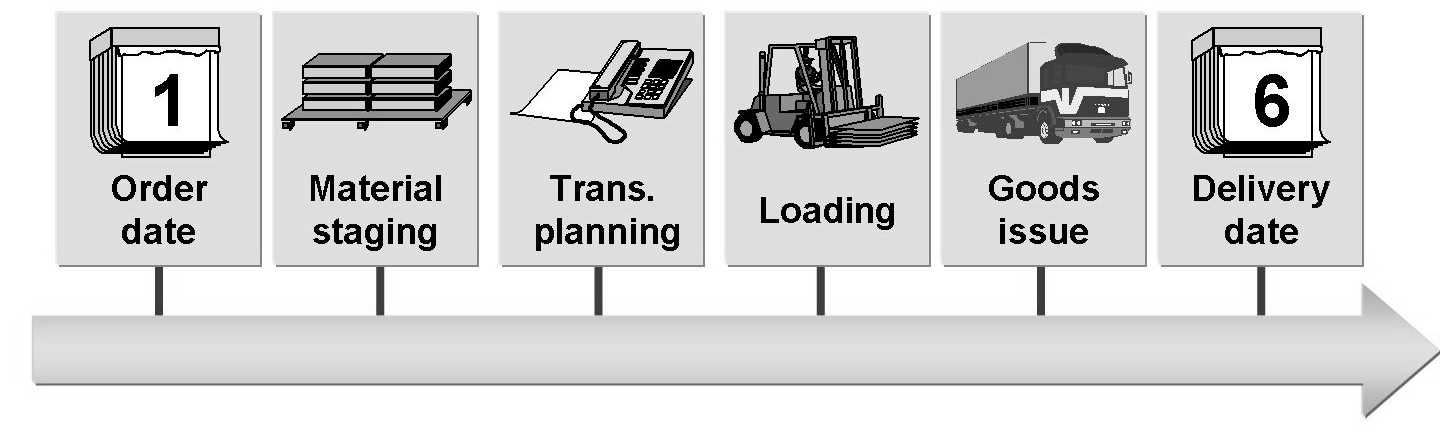
In shipment and transportation scheduling, you define the time at which the receipt of the goods at the customer can be acknowledged (confirmed delivery date). Different lead times are taken into account: the preparation time, loading time, transportation lead time, and transit time.

c-tscm62-66, c-tscm62-65, c-tscm62-64

The following data is used in shipment scheduling:


  • Order date: date on which the order is placed • Material availability date: date by which a sufficient quantity of goods must be available for picking and packing 
  • Loading date: date on which the goods picking and packing process is completed (and the mode of transport is available) so that loading can begin on time 
  • Goods issue date: the date on which the goods must leave the delivering plant so that they reach the customer on the agreed date 
  • Delivery date: date on which the goods arrive at the customer. A differentiation is made between: 
    • Requested delivery date: date on which the customer would like the goods to arrive 
    • Confirmed delivery date: date on which the goods receipt is confirmed for the customer

Saturday, 15 February 2014

Configuration of Shipping Point Determination in Delivery Process

In SAP SD process, shipping point plays key role in delivery process. In this blog I have tried to define all possible configuration with respect to Shipping point and its determination. Use the following steps to define to define and configure Shipping Point and determination in SAP SD.

Step 1: Define Shipping Conditions


Menu Path: SAP Customizing Implementation Guide --> Logistics Execution --> Shipping --> Basic Shipping Functions --> Shipping Point and Goods Receiving Point Determination --> Define Shipping Conditions

The shipping conditions are filled in the customer master record in the shipping screen and in the sales document type. Such settings are then come into the sales document while order creation and they are used to determine the shipping point in it. The shipping conditions can be manually changed in the sales order, or they can be set default to a particular sales document type. They can be set default to a particular sales document type, then system will ignore the setting on the customer master record.

Continue with copying a shipping condition and rename to define your requirements, using the prefix Z. The shipping condition name is a two-character alphanumeric value, as seen in screen below.


shipping point in sap sd delivery process

Now you can define the shipping condition with given path,

Menu Path: SAP Customizing Implementation Guide --> Logistics Execution --> Shipping --> Basic Shipping Functions --> Shipping Point and Goods Receiving Point Determination --> Define Shipping Conditions by Sales Document Type

Sunday, 5 January 2014

How to Define Billing Document Types in SAP SD


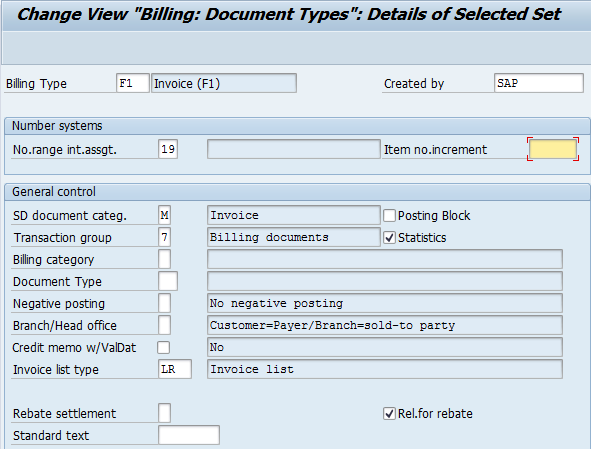
The billing document is similar to the delivery document in that it has a header and item level, but no schedule line level, as in the sales documents. Thus one must configure the header document type and the relevant item categories.

To define the billing document type, use the following menu path.

SAP Customizing Implementation Guide --> Sales and Distribution --> Billing--> Billing Documents --> Define Billing Types --> Define Billing Types

Change or Create Billing Document Types in SAP SD

Monday, 2 December 2013

Basics of Document Data Flow and Copying Control in SAP SD Process

Data flow and copying control are basic but most important functionality in SAP SD process. Copy Control functionality controls which data is copied from the source document to the following document. For example, you can define a fresh sales order type and utilize the recently created sales order type for a latest delivery order. For this intention, you can define a new copy control for data flow between these two sales documents. If you don’t maintain the copy control from an origin document type to a end document type and try to create the target document copying from the source, the system will prompt you with an error.

Data Flow:

You can create sales document with reference to a preceding document from both: 
  1. Initial screen and 
  2. During Document Processing
Create document with preceding document in SAP SD

Tuesday, 12 November 2013

Pricing Configuration in SAP SD

Pricing plays very vital role in SAP SD process, this is why it is very important for SAP SD aspirants to know pricing concept in depth for real time practice and certification exam perspective. In this blog I will explain you on how to configure the pricing in SAP SD. You can expect many more concepts related to pricing in upcoming blogs. 

You can follow my SAP SD Certification Guide to achieve maximum success in your SAP SD certification. Apart from this, I have designed 600+ topic wise question bank with accurate answers and related screenshot where you can not miss any questions for your SAP SD certification preparation.

Pricing configuration in SAP SD:


To create any pricing condition type, following steps you need to remember in short
  1. Define condition table
  2. Define condition type
  3. Define access sequence
  4. Assign access sequence to condition type
  5. Define and assign pricing procedure
    1. Maintain pricing procedure
    2. Define customer pricing procedure
    3. Define pricing procedure determination
1) Define Condition Table:

Navigate to given path
IMG --> Sales and Distribution --> Basic function --> Pricing --> Pricing Control --> Define Condition Tables --> Create Condition Table

Provide table no as 273(you can give any) and press enter


Create condition record in pricing configuration in SAP SD

Monday, 7 October 2013

Functions of Delivery Document in SAP SD Process

In standard SAP SD process, delivery document acts major role in complete order to cash process. It is responsible to initiate all processes behind shipping and delivery process. It may be starting from assigning the numbers to delivery document to picking, packing and delivery rescheduling. Please go through following functions of delivery documents in SAP SD process with given screenshot. You can mail me if you need more clarity on the same.

You can follow my SAP SD Certification Guide to achieve maximum success in your SAP SD certification. Apart from this, I have designed 600+ topic wise question bank with accurate answers and relative screenshot where you can not miss any questions for your SAP SD certification preparation.


Functions of Delivery Document in SAP SD Process:


1. You can configure number assignment range of delivery document in delivery document type. So when delivery document is created it will pick up the sequence number based on given internal number assignment and given increment number.


Number assignment in Delivery Document Type

Sunday, 15 September 2013

Functions of Item Category of Delivery Document in SAP SD Process

I have covered functions of item category in sales document in my past blog, now I am going to give insight on item category functions in delivery document and which is also very important in SAP SD certification exam (C_TSCM62_64, C_TSCM62_65 and C_TSCM62_66). I will expand this blog as quickly as possible with sufficient screenshots to bring more simplicity on sales document type. Please make a valuable comment or write me an email if I have missed any function or you need more clarity on listed functions.

You can follow my SAP SD Certification Guide to achieve maximum success in your SAP SD certification. Apart from this, I have designed 600+ topic wise question bank with accurate answers and related screenshot where you can not miss any questions for your SAP SD certification preparation.


Functions of Item Category of Delivery Document in SAP SD Process


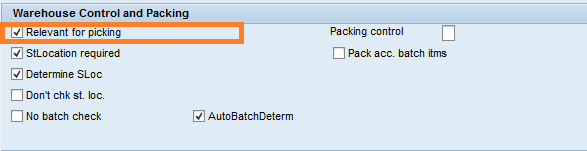
1) Item category in delivery specifies whether delivery items of this type are significant for picking or putaway.

functions of item category in delivery
Relevant for picking indicator in delivery item category 

Wednesday, 5 June 2013

How To Create Sales Document Type in SAP SD


Sales Document Types in SAP SD:

Sales Documents Types is a 2 character  indicator, by which system process different documents in different way.SAP provides many standard sales document type.
Sales documents types are used in:

  • Pre – sales activities (inquiry /quotation ).
  • Sales Order.
  • Sales Contract.
  • Customer Complaint.

In Sales order there are three levels:

  1. Header level data
  2. Item level data
  3. Schedule level data

In SAP several standard sales documents types are available.We can create custom sales document type by T-code-VOV8.

Create Internal No. Range for sales document type:

VN01 is T- code for creation for Internal No. range. We will use this internal no. in step-3.
  1. Enter T-code VN01 in command field in a new sap session.
  2. Click on Create button for interval .


Monday, 8 April 2013

All about Sales Document [Header / Line Item / Schedule Line] in SAP SD


Sales Order is a contract between a customer and sales organization for supplying goods or service to customer within a agreed time period.

Data on  the sales order  screen is derived  from  Customer Master  Table and Material Master Table for a particular sales area.The sales area that accepts the inquiry is responsible for completing the contract.


T-code for sales order is -
1.  VA01- Create sales order.
2.  VA02-Change sales order.
3.  VA03-Display sales order.


To create sales order we need data at four levels-

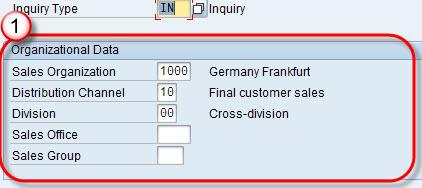
1. Organization data:  Organization data is first screen of sales document which contains fields like Sales organization,distribution channel,division,Sales Office ,Sales Group etc.


Monday, 25 March 2013

All About Material Exclusion & Inclusion (Listing) in SAP SD

Material  exclusion / listing provides a provision to restrict a customer’s buying choices. For example, if certain materials are  defined in “Exclusion List”  of a specific customer, then, the customer can not buy material from “Exclusion List”.

Example  – A company produce 10 materials and company want to sell only 6 material to customer ABC then company create a list of these 6 material as “Listing List “(products that can be ordered) and remaining 4 material may be in  “Exclusion List”. In this scenario Customer can buy only 6 material from “Listing List”.

Material exclusion / listing is controlled by condition technique. System check for material in “Exclusion List” first and later “Listing List”.

T-code-
1. VB01 to create,
2. VB02 to change,
3. VB03 to display.

Sunday, 17 March 2013

Create Material Master for Sales View


Purpose: This procedure is used to manually create material master for different view. Here sales view is used -

Step – 1
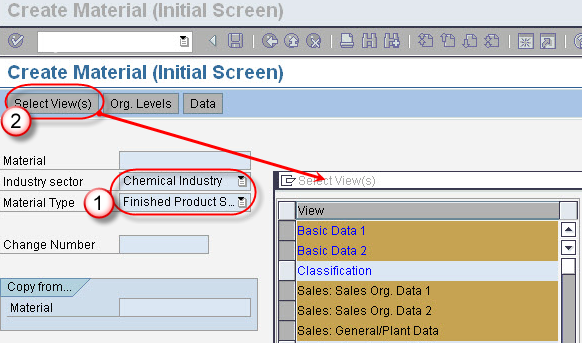
In T-Code MM01 “Create Material”
  1. Enter industry sector and material type.
  2. Click on Select View(s) Button. A pop window appears. In pop window, select view for which material to be created and click on check button.

Sunday, 24 February 2013

SAP SD Functions Keynote


You can crack most of the stuff in SAP SD Certification exam if you remember SAP SD functions very smartly. In this blog I have listed few functions and where they are affected in any SAP SD documents. 

Billing Block:
Sales document header
Sales document item
Delivery document header
Delivery document item

www.hypersmash.com