Showing posts with label SAP SD Certification Exam Material. Show all posts

Wednesday, 16 December 2015

SAP SD Certification Guide

This blog post is more suitable for SAP SD Certification exam code: C_TSCM62_66 (read tips to prepare for SAP SD)

I have written SAP SD certification exam and achieved 98%; I have designed the SAP SD certification material in depth, and I have come up with the exam reparation guide to crack it with full marks.

Note: The following approach is efficient for every candidate considering following parameters

Minimum efforts:
During weekdays: 2-3 hours/day
During  weekend: 5-6 hours/day

If you strictly follow this routine for at least 50 days, you are able to revise the entire SAP SD syllabus minimum 5-6 time. Here is the plan

1) First 30 days:     

Primary goal:

  • Complete the first time SAP SD syllabus material with SAP SD Online Training and do practice given in books & demo (in slides).
  • This will give you complete understanding of SAP SD business flow
  • You will be familiar with SAP SD screens and behavior of the SD system
  • You will be able to understand the basic settings for each business transaction

Secondary goal:

  • Spend 2-3 hours during the weekend on revising previous weeks units from SAP SD syllabus book, this will refine and firm the concept of SD business flow on the behavior of the system.
  • Note down the determination rules like shipping point determination, pricing procedure determination, etc. and some mandatory settings like activation settings for rebate process, etc. This will secure 10-20% of marks in exam.

2) Next 15 days – Revise the second time

Revise with SAP SD syllabus books reading, and watch necessary training videos and perform practicals which you are finding difficulties to understand the flow and give a topic wise test with question bank (which I have prepared for my exam).
  • Note down the following observation:
  • What functions works at header level, item level, and schedule line level
  • What basic setting required for each business flow in master data or IMG (like settings in document type, item category, etc.)
  • Above exercise will firm the SAP SD knowledge on the business process on the system behavior; this will enhance your confidence level to crack any SAP SD exam questions.
  • If you follow above, 30 days plan religiously you can secure your score up to 85% of SAP SD exam
  • Topic wise question bank will help you to remember the concept and firm understanding of tricky scenarios in SAP SD flows.

3) Next ten days – Revise the third time

Now your approach is to read very carefully one more time from books. If you have doubt on any settings, just observe the SAP screens. Don’t forget to link up each sentence with system behavior every-time and relate with real time scenarios if you have worked with same domain during your job experience. This exercise makes you perfect and completes you with a firm knowledge base.

4) Last five days - Practice with mock test papers

Last 20 days can lead you for ultimate success. Just give a mock test as you give for real time. I have prepared Premium sets of certification questions and answers vol.1, vol.2 and vol. 3 which is free with SAP SD Question Bank. Vol. 2 and Vol. 3 has answers with explanation. Here is your plan.
  • First give a mock test with vol. 3(80 questions) and check your result and see the explanations for wrong answers
  • Second time give a mock test with vol. 2(80 questions) and check for result with explanations for incorrect answers
  • Now analyse your weak areas/topics from past two mock tests and quickly prepare those topics from book and again check respective topic questions and answers in SAP SD question bank.
  • Finally, give a mock test with my premium set of certification questions test paper with 80 questions, compare with answers given, and I am sure this time you will score better than previous two tests. This confidence act as driving force in your actual exam, guaranteed.!!!
Notes:
  • Perform SAP SD mock exam test from this blog, this will lead you to expand your capability to link your concept with all topics covered and boosts your confidence to face any type of questions 
  • Spend at least one hour with any unit even if you have finished this plan. Do one more time revision for last one week before your SAP SD certification exam. You can just revise your notes on last day of your exam. Read SAP SD functions Keynotes
Fact: Never think that you know everything, because with every revision you will get to know new concepts to know, guaranteed.!!

Above all steps leads you to score 100%. All the best.

I have also prepared SAP SD Certification Questions Bank and real time SAP SD certification question, which gives you confidence to clear the exam with 100% money back guarantee.

View Candidates' Testimonial Page

Saturday, 7 February 2015

Create Storage Location in SAP SD

Transaction code :- OX09
IMG Menu Path :- SPRO> SAP Customizing Implementation Guide >Enterprise Structure Definition > Material Management > Maintain storage Location
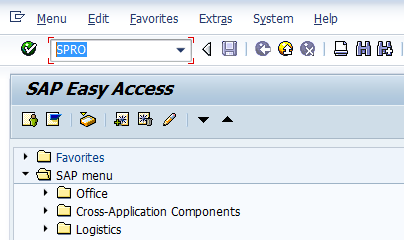
Step 1 :- Enter Transaction Code SPRO in the command field and press enter
SAP SD Certification Questions

 Step 2 : - Click on SAP Reference IMG
SAP SD Certification Questions


Monday, 17 November 2014

Creating a First Sales Order in SAP SD Process

Overview

Transaction VA01: creating a Sales Order from the beginning.
Sales order data in first screen: Document type, Sales organization, Distribution Channel, Division.
Sales order data in second screen: Ship to party, Sold to party. Header and Item data.

VA01

1: Go to Transaction code VA01  to create the Sales Order
Or navigate in menu [Logistics -> Sales and Distribution -> Sales -> Order -> Create ]
Here you have to fill the obligatory fiedls: Order type, Sales Organization, Distribution Channel and Division.
SAP SD Sales Order
2: Choose document type by F4 search in field Order Type. A pop-up window will open with all available document types. Double click to select one.
  SAP SD Sales Order

Thursday, 24 July 2014

Effect of Changing Sold To Party in SAP SD

This blog post is very helpful to understand the importance of Sold to Party and its importance. You will also learn the impact of changing Sold to Party in SAP SD process.

Usage of Sold to Party in Sales Document:

Once you have entered a sales document, you can change which sold-to party it is assigned to. This might be necessary in the following situations:

  • You entered the wrong sold-to party when you created the sales document
  • During telesales, you want to enter the item first and then the sold-to party. Here, you would work with the default sold-to party first.
  • In make-to-order production, you want to start with a work-to-order before the final customer is known.
  • The first customer rejects a make-to-order production order but it is accepted by someone else.

Features of Sold to Party:

Monday, 21 April 2014

SAP SD Condition Technique in Pricing

As a SAP SD consultant, you need to implement the SAP system which must meet organization product pricing strategies based on many requirements. With this blog you will learn the basic foundation on pricing configuration options to build the solution for your organization. In SAP pricing, conditions are built to meet requirement of many pricing factors like basic price, surcharges, freight, discounts and taxes. These pricing factors must be determined spontaneously for healthy business transactions.

Master Data for Conditions:

Master data for conditions is kept in condition records. The stages at which pricing is most usually carried out have been predefined and shipped in the standard version.

Generally, conditions can be well-defined at any key level. Thus, you can add extra key levels if necessary. A typical field catalog comprising the fields normally used in pricing is provided within Customizing for this purpose. You can add any additional fields to the field catalog release-independently.

Conditions
Prices
Discounts/Surcharges
Freight
Taxes
- Price List
- Material Price
- Customer Specific
- Other
- Customer
- Material
- Material Pricing Group
- Customer/Material Pricing Group
- Customer/Material
- Price group / material pricing group
- Other
- Incoterms, part 1
- Incoterms, part 1+2
- Other
- Departure Country/Destination Country
- Domestic
- Export
- Other

Sunday, 16 March 2014

Forward and Backwad Shipment Scheduling Process in SAP SD

Shipment Scheduling in Delivery Process:

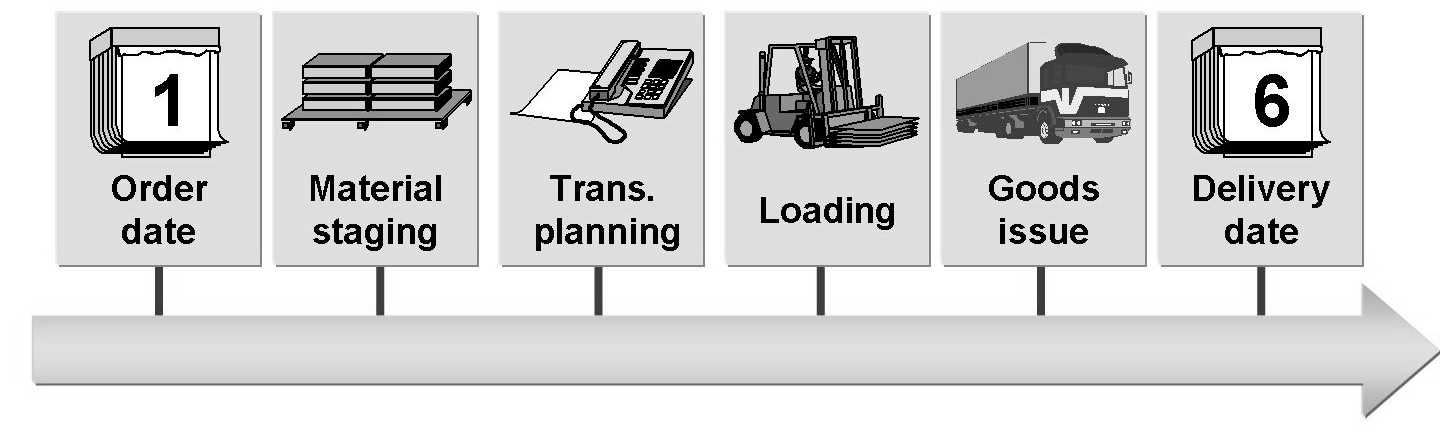
In shipment and transportation scheduling, you define the time at which the receipt of the goods at the customer can be acknowledged (confirmed delivery date). Different lead times are taken into account: the preparation time, loading time, transportation lead time, and transit time.

c-tscm62-66, c-tscm62-65, c-tscm62-64

The following data is used in shipment scheduling:


  • Order date: date on which the order is placed • Material availability date: date by which a sufficient quantity of goods must be available for picking and packing 
  • Loading date: date on which the goods picking and packing process is completed (and the mode of transport is available) so that loading can begin on time 
  • Goods issue date: the date on which the goods must leave the delivering plant so that they reach the customer on the agreed date 
  • Delivery date: date on which the goods arrive at the customer. A differentiation is made between: 
    • Requested delivery date: date on which the customer would like the goods to arrive 
    • Confirmed delivery date: date on which the goods receipt is confirmed for the customer

Sunday, 5 January 2014

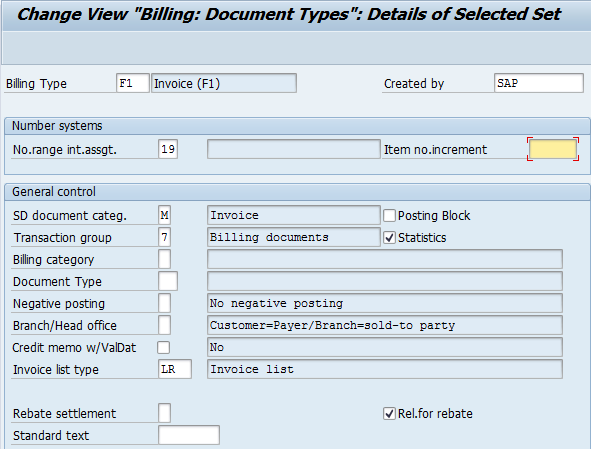
How to Define Billing Document Types in SAP SD


The billing document is similar to the delivery document in that it has a header and item level, but no schedule line level, as in the sales documents. Thus one must configure the header document type and the relevant item categories.

To define the billing document type, use the following menu path.

SAP Customizing Implementation Guide --> Sales and Distribution --> Billing--> Billing Documents --> Define Billing Types --> Define Billing Types

Change or Create Billing Document Types in SAP SD

Tuesday, 12 November 2013

Pricing Configuration in SAP SD

Pricing plays very vital role in SAP SD process, this is why it is very important for SAP SD aspirants to know pricing concept in depth for real time practice and certification exam perspective. In this blog I will explain you on how to configure the pricing in SAP SD. You can expect many more concepts related to pricing in upcoming blogs. 

You can follow my SAP SD Certification Guide to achieve maximum success in your SAP SD certification. Apart from this, I have designed 600+ topic wise question bank with accurate answers and related screenshot where you can not miss any questions for your SAP SD certification preparation.

Pricing configuration in SAP SD:


To create any pricing condition type, following steps you need to remember in short
  1. Define condition table
  2. Define condition type
  3. Define access sequence
  4. Assign access sequence to condition type
  5. Define and assign pricing procedure
    1. Maintain pricing procedure
    2. Define customer pricing procedure
    3. Define pricing procedure determination
1) Define Condition Table:

Navigate to given path
IMG --> Sales and Distribution --> Basic function --> Pricing --> Pricing Control --> Define Condition Tables --> Create Condition Table

Provide table no as 273(you can give any) and press enter


Create condition record in pricing configuration in SAP SD

Monday, 7 October 2013

Functions of Delivery Document in SAP SD Process

In standard SAP SD process, delivery document acts major role in complete order to cash process. It is responsible to initiate all processes behind shipping and delivery process. It may be starting from assigning the numbers to delivery document to picking, packing and delivery rescheduling. Please go through following functions of delivery documents in SAP SD process with given screenshot. You can mail me if you need more clarity on the same.

You can follow my SAP SD Certification Guide to achieve maximum success in your SAP SD certification. Apart from this, I have designed 600+ topic wise question bank with accurate answers and relative screenshot where you can not miss any questions for your SAP SD certification preparation.


Functions of Delivery Document in SAP SD Process:


1. You can configure number assignment range of delivery document in delivery document type. So when delivery document is created it will pick up the sequence number based on given internal number assignment and given increment number.


Number assignment in Delivery Document Type

Sunday, 15 September 2013

Functions of Item Category of Delivery Document in SAP SD Process

I have covered functions of item category in sales document in my past blog, now I am going to give insight on item category functions in delivery document and which is also very important in SAP SD certification exam (C_TSCM62_64, C_TSCM62_65 and C_TSCM62_66). I will expand this blog as quickly as possible with sufficient screenshots to bring more simplicity on sales document type. Please make a valuable comment or write me an email if I have missed any function or you need more clarity on listed functions.

You can follow my SAP SD Certification Guide to achieve maximum success in your SAP SD certification. Apart from this, I have designed 600+ topic wise question bank with accurate answers and related screenshot where you can not miss any questions for your SAP SD certification preparation.


Functions of Item Category of Delivery Document in SAP SD Process


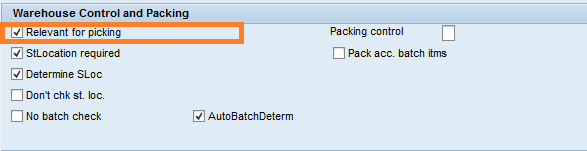
1) Item category in delivery specifies whether delivery items of this type are significant for picking or putaway.

functions of item category in delivery
Relevant for picking indicator in delivery item category 
www.hypersmash.com