Monday, 8 April 2013

All about Sales Document [Header / Line Item / Schedule Line] in SAP SD


Sales Order is a contract between a customer and sales organization for supplying goods or service to customer within a agreed time period.

Data on  the sales order  screen is derived  from  Customer Master  Table and Material Master Table for a particular sales area.The sales area that accepts the inquiry is responsible for completing the contract.


T-code for sales order is -
1.  VA01- Create sales order.
2.  VA02-Change sales order.
3.  VA03-Display sales order.


To create sales order we need data at four levels-

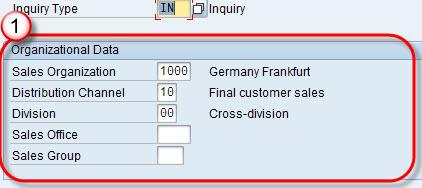
1. Organization data:  Organization data is first screen of sales document which contains fields like Sales organization,distribution channel,division,Sales Office ,Sales Group etc.

Monday, 25 March 2013

All About Material Exclusion & Inclusion (Listing) in SAP SD

Material  exclusion / listing provides a provision to restrict a customer’s buying choices. For example, if certain materials are  defined in “Exclusion List”  of a specific customer, then, the customer can not buy material from “Exclusion List”.

Example  – A company produce 10 materials and company want to sell only 6 material to customer ABC then company create a list of these 6 material as “Listing List “(products that can be ordered) and remaining 4 material may be in  “Exclusion List”. In this scenario Customer can buy only 6 material from “Listing List”.

Material exclusion / listing is controlled by condition technique. System check for material in “Exclusion List” first and later “Listing List”.

T-code-
1. VB01 to create,
2. VB02 to change,
3. VB03 to display.

Sunday, 17 March 2013

Create Material Master for Sales View


Purpose: This procedure is used to manually create material master for different view. Here sales view is used -

Step – 1
In T-Code MM01 “Create Material”
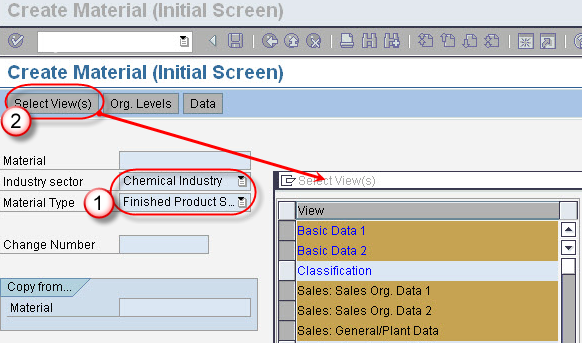
  1. Enter industry sector and material type.
  2. Click on Select View(s) Button. A pop window appears. In pop window, select view for which material to be created and click on check button.

Saturday, 9 March 2013

Functions of Item Category in SAP SD Process

I have seen that many candidates have failed to get firm clarity on item category and its functions. Here I have listed all possible functions covered in SAP SD Certification exam syllabus for C_TSCM62_64, C_TSCM62_65 and C_TSCM62_66. I will expand this blog as quickly as possible with sufficient screenshots to bring more simplicity on item category. Please make a valuable comment or write me an email if I have missed any function or you need more clarity on listed functions.

  • Item category is used to define whether system run automatic pricing for an item or not
  • Is it required the item appears on an invoice or not.
www.hypersmash.com