Thursday, 12 January 2017

SAP SD Sample Certification Questions - Set 2


Here I am posting sample SAP SD certification questions and answers (in other page), If you are able to crack these SAP SD certification questions then you have very clear concept of SAP SD process, these questions are just to test your understanding on topic. However, if you are serious about actual and similar questions set of SAP SD certification exam, I strongly encourage you to make use of our premium SAP SD Questions Sets and 600+ topic wise SAP SD Question Bank with Answers


Also look
SAP SD Certification Guide
SAP SD Sample Certification Questions - Set 1
SAP SD Sample Certification Questions - Set 3
SAP SD Sample Certification Questions - Set 4
SAP SD Sample Certification Questions - Set 5
SAP SD Sample Certification Questions - Set 6


1. Which of the following statements are correct?
  1. The pricing procedure contains account key for accruals
  2. The pricing procedure contains account key for sales revenue
  3. The pricing procedure contains account key for sales deductions
  4. The pricing procedure only contains condition types which are determined automatically
  5. The pricing procedure contains condition types which are mandatory in a sales document.


Thursday, 12 May 2016

SAP SD Sample Certification Questions - Set 4


Here I am posting sample SAP SD certification questions, If you are able to crack these question then you have very clear concept of SAP SD process

However, if you are serious about successful passing of SAP Certification Exam, we strongly encourage you to make use of our premium SAP SD Questions Sets


Also look
SAP SD Certification Guide
SAP SD Sample Certification Questions - Set 1
SAP SD Sample Certification Questions - Set 2
SAP SD Sample Certification Questions - Set 5
SAP SD Sample Certification Questions - Set 6


1. In tax identification determination, which of the following statements are correct? (Only one answer is correct)
  1. A rule has to be set per sales document type
  2. A rule has to be set per item category
  3. A rule has to be set per schedule line category
  4. A rule has to be set per company code
  5. A rule has to be set per sales organization.

Sunday, 7 February 2016

SAP SD Sample Certification Questions - Set 6


Here I am posting sample SAP SD certification questions, If you are able to crack these question then you have very clear concept of SAP SD process

However, if you are serious about successful passing of SAP Certification Exam, we strongly encourage you to make use of our premium SAP SD Questions Sets


Also look
SAP SD Certification Guide
SAP SD Sample Certification Questions - Set 1
SAP SD Sample Certification Questions - Set 2
SAP SD Sample Certification Questions - Set 4
SAP SD Sample Certification Questions - Set 5


1. Which of the following statements are correct?
  1. Billing block can be set in the sales document header and item level
  2. Billing block can be set in the sales document header and schedule line level
  3. Delivery block can be set in the sales document header and item level
  4. Delivery block can be set in the sales document header and schedule line level
  5. Partner procedure can be set at item level of a sales document.


2. Which of the following statements are correct?

  1. Incompletion procedure can be set at delivery document header
  2. Incompletion procedure can be set at delivery item level
  3. Incompletion procedure can be set at sales document header
  4. Partner procedure can be assigned to the schedule line category
  5. Partner procedure can be assigned to the item category of the delivery document.

SAP SD Sample Certification Questions - Set 5


Here I am posting sample SAP SD certification questions, If you are able to crack these question then you have very clear concept of SAP SD process

However, if you are serious about successful passing of SAP Certification Exam, we strongly encourage you to make use of our premium SAP SD Questions Sets

Also look

SAP SD Certification Guide
SAP SD Sample Certification Questions - Set 1
SAP SD Sample Certification Questions - Set 2
SAP SD Sample Certification Questions - Set 4
SAP SD Sample Certification Questions - Set 6


1. Which of the following statements are correct?
  1. Pricing conditions can be indicated manually in delivery
  2. Pricing in shiping can contain statistical conditions
  3. Pricing in shiping contains header conditions
  4. The item category group controls whether an item in the delivery can be chargeable
  5. The item category controls whether an item in the delivery can be chargeable.

Answers

2. The delivery document type controls which of the following?
  1. Delivery split
  2. Over delivery
  3. Picking
  4. Packing
  5. Posting setup.


Wednesday, 3 February 2016

SAP SD Sample Certification Questions - Set 3


Here I am posting sample SAP SD certification questions, If you are able to crack these question then you have very clear concept of SAP SD process

However, if you are serious about successful passing of SAP Certification Exam, we strongly encourage you to make use of our premium SAP SD Questions Sets


Also look


1. Which of the following statements about text in SAP SD are correct?
  1. Texts can be copied from source document to target document
  2. Texts is not found in condition records
  3. Texts can appear in promotion
  4. Texts can be configured to be available in a rebate agreement
  5. Texts is not found in a customer-material info record.


Sunday, 31 January 2016

SAP SD Sample Certification Questions - Set 1

Here I am posting sample SAP SD certification questions, If you are able to crack these question then you have very clear concept of SAP SD process


However, if you are serious about successful passing of SAP Certification Exam, we strongly encourage you to make use of our premium SAP SD Questions Sets

Also look
SAP SD Certification Guide
SAP SD Sample Certification Questions - Set 2
SAP SD Sample Certification Questions - Set 4
SAP SD Sample Certification Questions - Set 5
SAP SD Sample Certification Questions - Set 6


1. Which of the following statements about organizational structure are correct?
  1.     A sales organization sell goods only from plants assigned to the same company code
  2.     It is mandatory for the sales organization to be assigned to a plant if we intend to sell items produced in that plant
  3.     A plant is assigned to a sales organization and division
  4.     A sales organization is assigned to only one company code
  5.     A shipping point can be shared by more than one plant irregardless of company code.


Tuesday, 19 January 2016

How to Create Partner Function in SAP SD

What is Partner Function?

Partner   function is two-character identification key that describes the people and organization with whom you do the business, and who are therefore involved in transaction. Here is some standard Partner Function for customer-
  1. Sold-to party
  2. Ship-to party
  3. Bill-to party
  4. Payer
Partner Determination:
The Partner and business partner term in SAP SD refers to parties with whom you do business. Each business partner has specific role. E.g. Sold-to party - Business Partner who order the goods / Services. The Partner Determination can be done in three steps-

  1. Define Partner Function
  2. Create Partner Determination procedure by grouping Partner function.
  3. Assign the partner determination procedure to respective partner object.

Step 1 - Define Partner Function: 

  1. Enter T-Code VOPAN in Command Bar.
  2. Select Customer Master Partner Object
  3. Click on Change Button, Partner Determination Procedure Screen appear.

Wednesday, 16 December 2015

SAP SD Certification Guide

This blog post is more suitable for SAP SD Certification exam code: C_TSCM62_66 (read tips to prepare for SAP SD)

I have written SAP SD certification exam and achieved 98%; I have designed the SAP SD certification material in depth, and I have come up with the exam reparation guide to crack it with full marks.

Note: The following approach is efficient for every candidate considering following parameters

Minimum efforts:
During weekdays: 2-3 hours/day
During  weekend: 5-6 hours/day

If you strictly follow this routine for at least 50 days, you are able to revise the entire SAP SD syllabus minimum 5-6 time. Here is the plan

1) First 30 days:     

Primary goal:

  • Complete the first time SAP SD syllabus material with SAP SD Online Training and do practice given in books & demo (in slides).
  • This will give you complete understanding of SAP SD business flow
  • You will be familiar with SAP SD screens and behavior of the SD system
  • You will be able to understand the basic settings for each business transaction

Secondary goal:

  • Spend 2-3 hours during the weekend on revising previous weeks units from SAP SD syllabus book, this will refine and firm the concept of SD business flow on the behavior of the system.
  • Note down the determination rules like shipping point determination, pricing procedure determination, etc. and some mandatory settings like activation settings for rebate process, etc. This will secure 10-20% of marks in exam.

2) Next 15 days – Revise the second time

Revise with SAP SD syllabus books reading, and watch necessary training videos and perform practicals which you are finding difficulties to understand the flow and give a topic wise test with question bank (which I have prepared for my exam).
  • Note down the following observation:
  • What functions works at header level, item level, and schedule line level
  • What basic setting required for each business flow in master data or IMG (like settings in document type, item category, etc.)
  • Above exercise will firm the SAP SD knowledge on the business process on the system behavior; this will enhance your confidence level to crack any SAP SD exam questions.
  • If you follow above, 30 days plan religiously you can secure your score up to 85% of SAP SD exam
  • Topic wise question bank will help you to remember the concept and firm understanding of tricky scenarios in SAP SD flows.

3) Next ten days – Revise the third time

Now your approach is to read very carefully one more time from books. If you have doubt on any settings, just observe the SAP screens. Don’t forget to link up each sentence with system behavior every-time and relate with real time scenarios if you have worked with same domain during your job experience. This exercise makes you perfect and completes you with a firm knowledge base.

4) Last five days - Practice with mock test papers

Last 20 days can lead you for ultimate success. Just give a mock test as you give for real time. I have prepared Premium sets of certification questions and answers vol.1, vol.2 and vol. 3 which is free with SAP SD Question Bank. Vol. 2 and Vol. 3 has answers with explanation. Here is your plan.
  • First give a mock test with vol. 3(80 questions) and check your result and see the explanations for wrong answers
  • Second time give a mock test with vol. 2(80 questions) and check for result with explanations for incorrect answers
  • Now analyse your weak areas/topics from past two mock tests and quickly prepare those topics from book and again check respective topic questions and answers in SAP SD question bank.
  • Finally, give a mock test with my premium set of certification questions test paper with 80 questions, compare with answers given, and I am sure this time you will score better than previous two tests. This confidence act as driving force in your actual exam, guaranteed.!!!
Notes:
  • Perform SAP SD mock exam test from this blog, this will lead you to expand your capability to link your concept with all topics covered and boosts your confidence to face any type of questions 
  • Spend at least one hour with any unit even if you have finished this plan. Do one more time revision for last one week before your SAP SD certification exam. You can just revise your notes on last day of your exam. Read SAP SD functions Keynotes
Fact: Never think that you know everything, because with every revision you will get to know new concepts to know, guaranteed.!!

Above all steps leads you to score 100%. All the best.

I have also prepared SAP SD Certification Questions Bank and real time SAP SD certification question, which gives you confidence to clear the exam with 100% money back guarantee.

View Candidates' Testimonial Page

Thursday, 22 October 2015

How to Create Bill of Materials in SAP SD

A bill of material (BOM) describes the different components that together create a product. For example- A computer is a product. It is a combination of CPU, Keyboard, Monitor, Mouse etc. The bill of material contains the item number of each component, quantity required in the manufacture of a product and the unit of measure of the item.

SAP R/3 allows the creation of various categories of Bill of Material. Some of the categories of the BOM are -
  • Material BOM (T-code CS01) – A bill of material that you create for a material known as material BOM.
  • Equipment BOM (T-code-IB01) – Equipement BOM is used to describe the structure of equipment and to assign spare parts to equipment for maintenance purpose.
  • Sales Order BOM (T-code-CS61) -Sales Order BOM is used for make-to-order production of products according to the requirements of customers.
  • Functional location BOM (T-Code-IB11) – A functional location BOM can be created individually for each functional location or a group of technical objects.
  • Document BOM (T-code-CS11) - A complex document may be made up from multiple documents such as program, papers, technical drawing etc. These related information and documentation object grouped as a unit using a BOM.
Step-1  Create Material BOM
  1. Enter T-code CS01 in the command field.
  2. Enter Material / Plant / BOM usage.

Saturday, 7 February 2015

Create Storage Location in SAP SD

Transaction code :- OX09
IMG Menu Path :- SPRO> SAP Customizing Implementation Guide >Enterprise Structure Definition > Material Management > Maintain storage Location
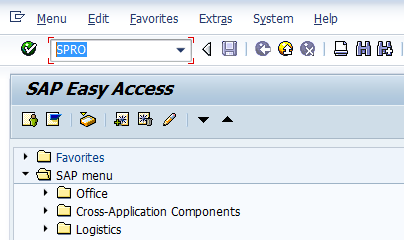
Step 1 :- Enter Transaction Code SPRO in the command field and press enter
SAP SD Certification Questions

 Step 2 : - Click on SAP Reference IMG
SAP SD Certification Questions


Monday, 17 November 2014

Creating a First Sales Order in SAP SD Process

Overview

Transaction VA01: creating a Sales Order from the beginning.
Sales order data in first screen: Document type, Sales organization, Distribution Channel, Division.
Sales order data in second screen: Ship to party, Sold to party. Header and Item data.

VA01

1: Go to Transaction code VA01  to create the Sales Order
Or navigate in menu [Logistics -> Sales and Distribution -> Sales -> Order -> Create ]
Here you have to fill the obligatory fiedls: Order type, Sales Organization, Distribution Channel and Division.
SAP SD Sales Order
2: Choose document type by F4 search in field Order Type. A pop-up window will open with all available document types. Double click to select one.
  SAP SD Sales Order

Tuesday, 7 October 2014

Output Determination Using Condition Technique in SAP SD

Outputs are an essential media of communication with various business partners & internal partner within the organization during or for sales processing. These output can be either be taken as print on paper or generated PDF files or sent by mails/electronically. You can even restrict or allow the trigger of these output.
Output determination using condition technique majorly defines 3 functions:
1. Automatic determination of output in respective object.
2. Processing of output based on some events.
3. Respective parameter/medium for print.
So, output types are assigned to
  • Partner functions,
  • Transmission media and
  • Dispatch time.
You need to co-ordinate with ABAPers for output processing program and form.
Output determination is carried out through condition technique in Sales and Distribution.
Application
Keys Area
V1
Sales
V2
Shipping
V3
Billing
V6
Handling Units
V7
Transport

Types of Output

  • Print Output,
  • Fax,
  • Telex,
  • E-Mail
  • EDI (Electronic Data Interchange)

Output Determination

Output is determined using condition technique.
Output can be determined from customer master, but it is recommended that Output in sales document through output determination procedure(Condition technique). Output can be determined separately for Sales Document: Header and Sales Document: Item level.
Unlike any other determination procedure getting determined through condition technique. The output determination also involves,
  • Condition Table
  • Access Sequence
  • Condition Types
  • Output Determination Procedure
  • Output Determination Procedure Assignment

1.) Condition Table

TCode
V/57
SPRO Path
IMG - SD - Basic Function - Output Control 
- Output Determination using Condition Technique 
- Output Determination for Sales Documents 
- Maintain Condition Table
You have to define combination of fields for which you want condition records in condition tables of output. Provided existing standard condition tables does not meet your requirement. In case of new condition table enter name of condition table, the number of table must be starting from 900. Select the fields for table from allowed fields and generate new condition table.

2.) Access Sequence

SPRO Path
IMG - SD - Basic Function - Output Control 
- Output Determination using Condition Technique 
- Output Determination for Sales Documents 
- Maintain Access Sequence
You have to define new access sequence by copying existing one and change to your requirement, provided standard access sequence does not meet you requirement. It is search strategy which system uses to find out condition records stored in condition tables for condition types. Unlike pricing, all output type has access sequence. Therefore, you maintain output condition record for all output types.

3.) Output Types

TCode
V/30
SPRO Path
IMG - SD - Basic function - Output control 
- Output determination using condition technique 
- Output determination for sales documents 
- Maintain Output Types
You have to define new Output types by copying existing one and change to your requirement, provided standard output type does not meet you requirement.
  • Languages of Output
  • Print Program: print specification
  • SAP Script: layout
  • Partners (to whom you need to send output)
    You need to mention Partner function wise Output type.

3.1.) Assign Output types of Partner Function

SPRO Path
IMG - SD - Basic Function - Output Control 
- Output determination using condition technique 
- Output determination for Sales documents 
- Assign Output type to Partner Function
Here you assign Output types to desired Partner function like SP/SH/PY etc.. Generally that would be the intent recipient of that output type.

4.) Maintain Output Determination Procedure

SPRO Path
IMG - SD - Basic function - Output control 
- Output determination using condition technique 
- Output determination for sales documents 
- Maintain Output determination procedures
You have to define new Output determination procedure by copying existing one and change to your requirement, provided standard output determination procedure does not meet you requirement.

5.) Assign Output Determination Procedure

TCode
V/43 
Assign Output determination procedure to Sales document header level
TCode
V/69 
Assign Output determination procedure to Sales document item category
SPRO Path
IMG - SD - Basic Function - Output control 
- Output determination using condition technique 
- Output determination for sales documents 
- Assign Output determination procedures
You need to assign output determination procedure to Sales document. You may assign as per your requirement Header level and item level.
Similar steps could be followed for output determination for Sales activities and Billing documents

Define Communication Strategy

SPRO Path
IMG - SD - Basic Function - Output Control - Determine Communication Strategy
You need to create communication strategy, system should search for communication methods in case of transmission medium 5.

Output Determination Level & Assignment in Sales

Output Determination - Level
Assign to
Output Determination - Sales Document: Header
assigned to Sales Document Type
Output Determination - Sales Document: Item
assigned to Sales Document Item Category
Output Determination - Delivery Document: Header
assigned to Delivery Type
Output Determination - Delivery Document: Item
assigned to Delivery Item Category
Output Determination - Billing Document: Header
assigned to Billing Type
Output Determination - Billing Document: Item
assigned to Billing Type

Some Standard Output Types

Output Type relevant Sales Document
Standard Output Type
Transfer Order
WMTA
Packing
PL00
Sales Orders
BA00
Cash Sales
RD03
Sales Invoice
RD00
Delivery Note
LD00

Condition Record

Without or in absence proper condition record maintenance, the desired output type will not determine in relevant sales document type. Therefore condition record is crucial in Automatic determination of output type.
TCode
Condition Record Maintenance for
VV11 / VV12 / VV13
Sales Document relevant Output Type
VV21 / VV22 / VV23
Delivery Document relevant Output Type
VV31 / VV32 / VV33
Billing Document relevant Output Type

Thursday, 28 August 2014

How to Create and Run Pricing Report

What is the purpose of Pricing Report in SAP SD:

If you want information about pricing data stored in the system, you can create pricing reports. Pricing reports put together information from condition records, condition types and condition tables according to various different criteria. A report can provide you, for example, with answers to the following questions:

  • Which customer-specific price agreements were made within a certain period?
  • Which condition records exist for freight charges?
  • Which condition records exist for customers in a particular region or country?
Pricing reports are created in Customizing according to your company requirements and can be executed via the application menu. By using specific selection criteria you can change the scope of the pricing report, but you cannot change the criteria used to create the pricing report. This is carried out in Customizing.

Thursday, 24 July 2014

Effect of Changing Sold To Party in SAP SD

This blog post is very helpful to understand the importance of Sold to Party and its importance. You will also learn the impact of changing Sold to Party in SAP SD process.

Usage of Sold to Party in Sales Document:

Once you have entered a sales document, you can change which sold-to party it is assigned to. This might be necessary in the following situations:

  • You entered the wrong sold-to party when you created the sales document
  • During telesales, you want to enter the item first and then the sold-to party. Here, you would work with the default sold-to party first.
  • In make-to-order production, you want to start with a work-to-order before the final customer is known.
  • The first customer rejects a make-to-order production order but it is accepted by someone else.

Features of Sold to Party:

www.hypersmash.com