Sunday, 5 January 2014

How to Define Billing Document Types in SAP SD


The billing document is similar to the delivery document in that it has a header and item level, but no schedule line level, as in the sales documents. Thus one must configure the header document type and the relevant item categories.

To define the billing document type, use the following menu path.

SAP Customizing Implementation Guide --> Sales and Distribution --> Billing--> Billing Documents --> Define Billing Types --> Define Billing Types
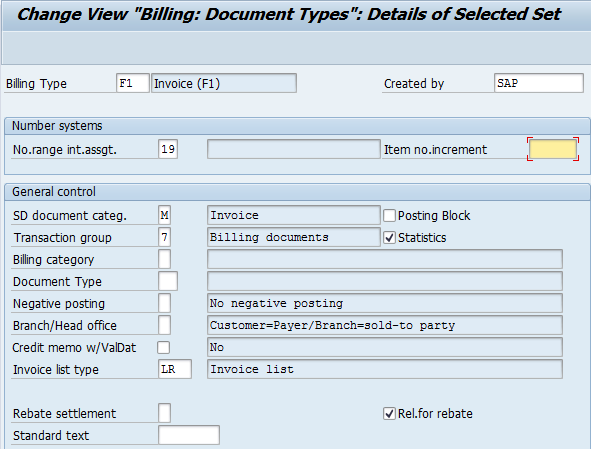
Change or Create Billing Document Types in SAP SD

Monday, 2 December 2013

Basics of Document Data Flow and Copying Control in SAP SD Process

Data flow and copying control are basic but most important functionality in SAP SD process. Copy Control functionality controls which data is copied from the source document to the following document. For example, you can define a fresh sales order type and utilize the recently created sales order type for a latest delivery order. For this intention, you can define a new copy control for data flow between these two sales documents. If you don’t maintain the copy control from an origin document type to a end document type and try to create the target document copying from the source, the system will prompt you with an error.

Data Flow:

You can create sales document with reference to a preceding document from both: 
  1. Initial screen and 
  2. During Document Processing
Create document with preceding document in SAP SD

Tuesday, 12 November 2013

Pricing Configuration in SAP SD

Pricing plays very vital role in SAP SD process, this is why it is very important for SAP SD aspirants to know pricing concept in depth for real time practice and certification exam perspective. In this blog I will explain you on how to configure the pricing in SAP SD. You can expect many more concepts related to pricing in upcoming blogs. 

You can follow my SAP SD Certification Guide to achieve maximum success in your SAP SD certification. Apart from this, I have designed 600+ topic wise question bank with accurate answers and related screenshot where you can not miss any questions for your SAP SD certification preparation.

Pricing configuration in SAP SD:


To create any pricing condition type, following steps you need to remember in short
  1. Define condition table
  2. Define condition type
  3. Define access sequence
  4. Assign access sequence to condition type
  5. Define and assign pricing procedure
    1. Maintain pricing procedure
    2. Define customer pricing procedure
    3. Define pricing procedure determination
1) Define Condition Table:

Navigate to given path
IMG --> Sales and Distribution --> Basic function --> Pricing --> Pricing Control --> Define Condition Tables --> Create Condition Table

Provide table no as 273(you can give any) and press enter


Create condition record in pricing configuration in SAP SD

Monday, 7 October 2013

Functions of Delivery Document in SAP SD Process

In standard SAP SD process, delivery document acts major role in complete order to cash process. It is responsible to initiate all processes behind shipping and delivery process. It may be starting from assigning the numbers to delivery document to picking, packing and delivery rescheduling. Please go through following functions of delivery documents in SAP SD process with given screenshot. You can mail me if you need more clarity on the same.

You can follow my SAP SD Certification Guide to achieve maximum success in your SAP SD certification. Apart from this, I have designed 600+ topic wise question bank with accurate answers and relative screenshot where you can not miss any questions for your SAP SD certification preparation.


Functions of Delivery Document in SAP SD Process:


1. You can configure number assignment range of delivery document in delivery document type. So when delivery document is created it will pick up the sequence number based on given internal number assignment and given increment number.


Number assignment in Delivery Document Type
www.hypersmash.com